Firewall, The Basic Security Network on Your Computer.


Did you know that when your computer is connected to the internet, it has over 131,000 ‘ports’ that a hacker could connect to? These ports are like doors in a building and if they aren’t protected properly, then someone could sneak in without you noticing. If the hacker is not installing a virus, they can still do some serious damage without alerting your security software, including transmitting your personal information. So how do you watch all of these doorways to your information? You need a firewall!

In construction terms, a firewall is a fire-resistant wall that subdivides a building to stop the spread of fire from one area to another. In computer terms, we need to stop communications between your computer and others on the internet. A total block of all internet communication would be useless though, so you need a way of selecting which type of communications you want to receive. For this, computer firewalls have rules and filters much like construction firewalls have access doors.

Where do I put this firewall?

Firewalls can be on a hardware box (a separate unit or part of your internet modem or router) or can be software installed on your computer. Most popular security software packages also include a firewall. A hardware firewall is great for providing a barrier before your computer is even reached and will also mean that your computer doesn’t have to spend its precious resources on running the firewall software. It also reduces the risk of the firewall itself being compromised, as some viruses can try and disable security software features that are running on your computer. The downside is that a hardware-based firewall can be more expensive and not as easy to configure and maintain if you are unsure of how to use them.

If Microsoft gives me a firewall, do I need another one?

The Windows Firewall (on Windows XP Service Pack 2 and Vista) only examines inbound communications coming into your computer from the internet. If your computer becomes infected (e.g. if you install some free software that turns out to have a hidden nasty) then your outbound communication to other computers on the internet won’t be examined or filtered. This can turn your computer into a source of infection, impacting your security and internet connection. It’s also not recommended that you run more than one software firewall as this uses more processing power and can cause conflicts, so if your security software includes a firewall, turn off the Windows Firewall.

If I have a secure wireless connection do l need a firewall?

A wireless connection is another way to get onto the internet and wireless security controls who can use that connection. This is similar to allowing who can plug into your phone line. Once you are connected, your 131,000+ ports are still open to hackers, so you still need a firewall. A firewall may be included on your wireless router but it pays to check.

Why does it keep on giving me messages?

If you are doing something specific (like installing new software or troubleshooting a connection problem) you may need to temporarily disable your firewall. Software firewalls may alert you that a connection has been attempted and blocked and may ask if you wish to allow that kind of connection in the future. In general, if you are doing something new which would probably involve a connection to the internet, you can allow the connection – either ‘this time only’ or for all future connection attempts. If in doubt, block it, as you can always allow it later if you find that it is needed.

Firewalls provide an enhanced level of security that has now become the minimum standard to protect your computer. They do require a certain level of knowledge or a great computer support person, so talk to your local Computer Troubleshooter to ensure that you are protected.
[Read More...]


Softwere Untuk Mempermudah dalam Menghafal Vocabulary / kosa kata Bahasa Asing.


Hai sobat Blogger, kali ini aku mau share sebuah softwere nih yang fungsinya sangat membantu kita dalam menghafal vocabulary atau kosa kata bahasa  asing yang sulit kita hafal. Dengan bantuan softwere ini menghafal akan lebih mudah dan menyenangkan. Softwere ini  cukup praktis  kok. Nama softwerenya adalah Mnemosyne.
         Mnemosyne adalah sebuah program gratis (freewere) yang bebas di download di internet. Meskipun  freewere, aplikasi ini cukup berguna bagi seorang newbie yang  ingin mengingat banyak kosa kata atau vocabulary. Berikut adalah kelebihan kelebihan dari softwere ini:
  • Di lengkapi dengan form category yang memudahkan kita untuk megambil dan mengatur dack (kartu-kartu) yang berisikan kosakata. Dan playing pada satu category tertentu tidak random.
  • Dilengkapi dengan Grade of Memmories, yang berfungsi sebagai penilaian dari bagaimana anda menghafal kata tersebut. Gradenya berasal dari  1-5 yang mana semakin tinggi maka gradenya semakin bagus.
  • Dilengkapi oleh statistik yang memungkinkan menunjukan rata rata perkembangan hafalan anda.
  • Friendly user, mudah digunakan dan praktis.
Untuk download filenya dapat mengklik gambar di bawah ini


Berikut adalah cara mainnya:
ADDING CARD

  • Anda harus membuat deretan kata yang ingin anda hafal dengan klik “Add cards”.
  • Kemudian akan muncul kotak dialog sebagai berikut

Add Cards:


  • Pilih Category kata anda misalnya Place. Berarti semua kata yang masuk pada kata ini termasuk kosa kata yang menyangkut dengan tempat.
  • Isi Question (pertanyaan) dan Answer (jawaban).
  • Centang Vice Versa too, jika and ingin pertanyaan dan jawaban bisa jadi terbalik sutau saat jawaban akan juga dapat menjadi pertanyaan.
  • Plih initial grade, maksudnya adalah anda di haruskkan untuk memilih pada level brapa anda hafal kosa kata tersebut. Grade 1-5, semain tinggi bererti anda menendai kalau kata tersebut sudah anda hafal dengan lancar.
  •  Klik preview juka ingin melihat hasil sementara.

PLAYING THE CARD

  • Pada session ini, anda akan mulai menghafal. Ketika anda membuka program Mnemosyne ini, anda brarti telah memasuki scadule. Lihat kotak dialog berikut:

Cara Bermain:


  • Anda hanya perlu melihat pertanyaan dan menjawabnya dalam hati.
  • Ketika anda yakin dengan jawaban anda maka klik “Show answer”, maka jawaban yang benar akan muncul.
  • Grade hafalan anda , bagaimana and menghafal kata tadi. Jika anda masih sulit menghafalnya maka anda dapat mencentang grade 0-1 dan normal pada2-3 dan lancar pada grade 4-5. Dari grade inilah anda akan memperoleh hasil sitematik hafalan anda serta jika and memilih grade 0-1  maka secara otomatis softwere ini akaan mendeteksi kesulitan anda dalam menghafal kosa kata tersebut sehingga softwere ini akan lebih sering mengulang kata kata yang sulit anda hafal tersebut.
          Berikut ini adalah kata kata yang saya kumpulkan bisa di download dan di aplikasikan di rumah sehingga anda tidak repot repot lagi untuk add card. Saya sedang belajar bahasa inggris jadi kata kata ini berisikan pertanyaan dalam inggris – indonesia atau sebaliknya.

DOWNLOAD MY CARD

           Trus gimana cara membuka filenya? gampang kok. Untuk membukanya anda perlu mengcopy file tersebut ke directory dimana anda mengistal Mnemosyne => buka aplikasi Mnemosyne => klik file => Open => cari deck (file ber ekstensi .mem) yang ingin di buka tentunya di directori dimana anda mengcopynya.

           Terimakasih, itulah sharing saya kali ini. Jika softwere dan tutorial ini sangat membantu maka saya harapkan anda memberi komment atau kritik serta pertanyaan juga boleh... sampai jumpa pada postingan selanjutnya.
[Read More...]


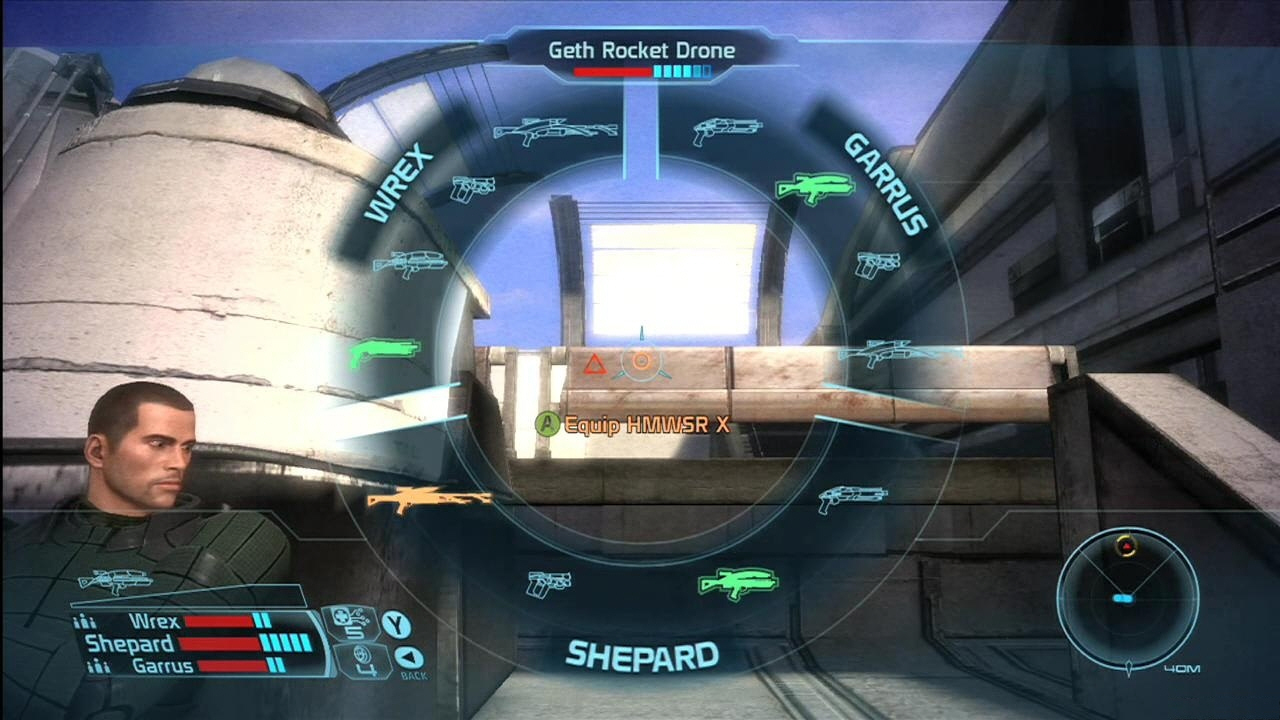
Free Download Game Mass Effect (PC Game)


~~ INFORMATION~~
Year: 2008
Genre: RPG (Rogue / Action) / 3D / 3rd Person
Developer: BioWare Corporation and Demiurge Studios
Publisher: Electronic Arts
Language: English
Released: DETONATiON
~~SYSTEM REQUIREMENT~~

Operating System
Windows XP or Vista Windows XP or Vista
Processor:
2.4+GHZ Intel or 2.0+GHZ AMD 2.4 + 
Memory:
1 Gigabyte Ram (XP) 1 Gigabyte Ram (XP)
2 Gigabyte Ram (Vista) 2 Gigabyte Ram (Vista)
Video Card: Video Card:
NVIDIA GeForce 6 series(6800GT or better)
ATI 1300XT or better (X1550, X1600 Pro and HD2400 are below minimum system requirements)
Hard Drive Space
12 Gigabytes 12 Gigabytes
Sound Card:
DirectX 9.0c compatible sound card and drivers

SCREENSHOT:


Link Download:

http://www.indowebster.com/Mass_Effectpart1rar.html
http://www.indowebster.com/Mass_Effectpart2rar.html
http://www.indowebster.com/Mass_Effectpart3rar.html
http://www.indowebster.com/Mass_Effectpart4rar.html
http://www.indowebster.com/Mass_Effectpart5rar.html
http://www.indowebster.com/Mass_Effectpart6rar.html
http://www.indowebster.com/Mass_Effectpart7rar.html
http://www.indowebster.com/Mass_Effectpart8rar.html


Password : indowebster4ever


[Read More...]


Free Download Harry Potter The Deathly Hallows (part II)


SYNOPSIS

          Harry Potter speaks with Griphook about breaking into Bellatrix Lestrange's vault at Gringotts bank, suspecting that a Horcrux may be hidden there. Griphook agrees to take Harry, Ron, and Hermione to the vault in exchange for the Sword of Gryffindor. Harry asks Ollivander, a wandmaker, to identify two wands they took from Malfoy Manor. Ollivander says they belonged to Bellatrix and Draco Malfoy, but Malfoy's wand has changed its allegiance to Harry.

          Hermione uses Polyjuice potion to disguise herself as Bellatrix and uses Bellatrix's wand in place of her own. At Bellatrix's vault, Harry discovers that the Horcrux is Helga Hufflepuff's Cup. He obtains the cup but Griphook steals the sword and abandons the trio, leaving them cornered by the alerted security. However, the three release the dragon guardian and flee. Harry has a vision of Voldemort killing Goblins, including Griphook, and learns that the Dark Lord has discovered the theft. Harry also learns there is a Horcrux at Hogwarts, that is in some way related to Rowena Ravenclaw. The trio apparate into Hogsmeade, which sets off an alarm. They are rescued by Aberforth Dumbledore, who instructs a portrait of his younger sister, Ariana, to fetch Neville Longbottom who leads the trio through a secret passageway into Hogwarts.


Screen Shot:


[Read More...]


Related Posts Plugin for WordPress, Blogger... 0" />
 

Recent Comment

Labels

Belajar (7) Computer (13) Ebook (2) Forum (2) Games (4) bisnis (21) download (25) internet (4) movie (3) mp3 (3) musik (3) news (15) softwere (13) tips dan trik (21) tutorial (16)
SEO Stats powered by MyPagerank.Net

Blogroll

===A===


Azqia Info
Ainun Mardiyyah blog..

===B===


Blog'e Cah Nganjuk(Dofollow Blog)
Blog Hacc

===C===


Online Cyber Community

===D===


Dayerz Review

===E===


===F===


Fabrian Web
firdaus45

===G===


===H===


===I===


===J===


===K===


Kerajaan Air Mata

===L===


===M===


===N===


===O===


===P===


===Q===


===R===


Rama88

===S===


Sayantifico | Sans's Blog

===T===


===U===


===V===


===W===


===X===


===Y===


===Z===


Zamrud Hijau
Return to top of page Copyright © 2010 | Platinum Theme Converted into Blogger Template by HackTutors